Vídeo
Pixelcut Looping Video Variantes: 4
desde 0,08 $ / segundo
80 créditos de API / segundo
5 s ≈ 0,40 $
No hay coincidencias. Prueba con «video», «FLUX» o «webhooks».
Cargando modelos…
pixelcut/product-photo
# Run the model; wait up to 20 s for the finished result in the same call
curl -X POST "https://api.doitong.com/v1/run/pixelcut/product-photo?wait=20" \
  -H "Authorization: Bearer $DOITONG_API_KEY" \
  -H "Content-Type: application/json" \
  -d '{
    "image": "https://content.doitong.com/images/showcase/v3/gen_fox_cartoon.jpg"
  }'

# Still "queued" or "running"? Poll with the id from the response:
curl "https://api.doitong.com/v1/requests/REQUEST_ID?wait=20" \
  -H "Authorization: Bearer $DOITONG_API_KEY"
const API = "https://api.doitong.com/v1";
const headers = {
"Authorization": "Bearer " + process.env.DOITONG_API_KEY,
"Content-Type": "application/json",
};
// Run the model; wait up to 20 s for the finished result in the same call
let res = await fetch(API + "/run/pixelcut/product-photo?wait=20", {
method: "POST",
headers,
body: JSON.stringify({
"image": "https://content.doitong.com/images/showcase/v3/gen_fox_cartoon.jpg"
}),
});
let request = await res.json();
if (!res.ok) throw new Error(request.error.code + ": " + request.error.message);
// Not finished yet: long-poll until it is
while (request.status === "queued" || request.status === "running") {
res = await fetch(API + "/requests/" + request.id + "?wait=20", { headers });
request = await res.json();
}
if (request.status !== "succeeded") throw new Error(JSON.stringify(request.error));
console.log(request.outputs.map((o) => o.url), request.cost.credits + " API credits ($" + request.cost.usd + ")");import os
import requests
API = "https://api.doitong.com/v1"
headers = {"Authorization": "Bearer " + os.environ["DOITONG_API_KEY"]}
payload = {
"image": "https://content.doitong.com/images/showcase/v3/gen_fox_cartoon.jpg",
}
# Run the model; wait up to 20 s for the finished result in the same call
r = requests.post(API + "/run/pixelcut/product-photo", params={"wait": 20}, json=payload, headers=headers)
request = r.json()
if not r.ok:
raise RuntimeError(request["error"]["code"] + ": " + request["error"]["message"])
# Not finished yet: long-poll until it is
while request["status"] in ("queued", "running"):
request = requests.get(API + "/requests/" + request["id"], params={"wait": 20}, headers=headers).json()
if request["status"] != "succeeded":
raise RuntimeError(request["error"])
print([o["url"] for o in request["outputs"]], request["cost"]["credits"], "API credits", "$" + request["cost"]["usd"])# 1. Connect once (Claude Code; Cursor, VS Code, Claude Desktop: https://doitong.com/es-ES/developers/docs/mcp)
claude mcp add --transport http doitong-models https://api.doitong.com/v1/mcp \
--header "Authorization: Bearer $DOITONG_API_KEY"
# 2. Your agent calls the "run" tool with:
{
"model_id": "pixelcut/product-photo",
"input": {
"image": "https://content.doitong.com/images/showcase/v3/gen_fox_cartoon.jpg"
}
}Llama al modelo Pixelcut Product Photo (pixelcut/product-photo) a través de Doitong API. Documentación para agentes: https://doitong.com/es-ES/developers/models/pixelcut/product-photo.md
POST https://api.doitong.com/v1/run/pixelcut/product-photo?wait=20
Authorization: Bearer $DOITONG_API_KEY
Content-Type: application/json
{
"image": "https://content.doitong.com/images/showcase/v3/gen_fox_cartoon.jpg"
}
Si el estado de la respuesta es "queued" o "running", consulta GET https://api.doitong.com/v1/requests/REQUEST_ID?wait=20 hasta que sea "succeeded"; los archivos están en outputs[].url. POST https://api.doitong.com/v1/quote/pixelcut/product-photo con el mismo cuerpo devuelve el precio exacto antes de la ejecución.Esta solicitud: 0,024 $ 24 créditos de API Ejecutar en esta página
Tu nueva clave de API. Solo se muestra ahora y ya está incluida en el código y en el campo de clave de API de abajo. Mantenla en secreto: nunca la incluyas en código que se ejecute en un navegador.
Crea una solicitud a continuación y ejecútala con tu clave de API. Las salidas se copian en nuestro almacenamiento, conservadas para siempre o 7 días gratis.
Los controles se generan a partir del esquema del modelo. El código y el precio se actualizan al modificarlos.
/run/pixelcut/product-photo?wait=20
presupuesto → 0,024 $
# Run the model; wait up to 20 s for the finished result in the same call
curl -X POST "https://api.doitong.com/v1/run/pixelcut/product-photo?wait=20" \
  -H "Authorization: Bearer $DOITONG_API_KEY" \
  -H "Content-Type: application/json" \
  -d '{
    "image": "https://content.doitong.com/images/showcase/v3/gen_fox_cartoon.jpg"
  }'

# Still "queued" or "running"? Poll with the id from the response:
curl "https://api.doitong.com/v1/requests/REQUEST_ID?wait=20" \
  -H "Authorization: Bearer $DOITONG_API_KEY"
const API = "https://api.doitong.com/v1";
const headers = {
"Authorization": "Bearer " + process.env.DOITONG_API_KEY,
"Content-Type": "application/json",
};
// Run the model; wait up to 20 s for the finished result in the same call
let res = await fetch(API + "/run/pixelcut/product-photo?wait=20", {
method: "POST",
headers,
body: JSON.stringify({
"image": "https://content.doitong.com/images/showcase/v3/gen_fox_cartoon.jpg"
}),
});
let request = await res.json();
if (!res.ok) throw new Error(request.error.code + ": " + request.error.message);
// Not finished yet: long-poll until it is
while (request.status === "queued" || request.status === "running") {
res = await fetch(API + "/requests/" + request.id + "?wait=20", { headers });
request = await res.json();
}
if (request.status !== "succeeded") throw new Error(JSON.stringify(request.error));
console.log(request.outputs.map((o) => o.url), request.cost.credits + " API credits ($" + request.cost.usd + ")");import os
import requests
API = "https://api.doitong.com/v1"
headers = {"Authorization": "Bearer " + os.environ["DOITONG_API_KEY"]}
payload = {
"image": "https://content.doitong.com/images/showcase/v3/gen_fox_cartoon.jpg",
}
# Run the model; wait up to 20 s for the finished result in the same call
r = requests.post(API + "/run/pixelcut/product-photo", params={"wait": 20}, json=payload, headers=headers)
request = r.json()
if not r.ok:
raise RuntimeError(request["error"]["code"] + ": " + request["error"]["message"])
# Not finished yet: long-poll until it is
while request["status"] in ("queued", "running"):
request = requests.get(API + "/requests/" + request["id"], params={"wait": 20}, headers=headers).json()
if request["status"] != "succeeded":
raise RuntimeError(request["error"])
print([o["url"] for o in request["outputs"]], request["cost"]["credits"], "API credits", "$" + request["cost"]["usd"]){
"jsonrpc": "2.0",
"id": 1,
"method": "tools/call",
"params": {
"name": "run",
"arguments": {
"model_id": "pixelcut/product-photo",
"input": {
"image": "https://content.doitong.com/images/showcase/v3/gen_fox_cartoon.jpg"
},
"wait_seconds": 20
}
}
}Tu clave permanece en este navegador: solo se envía a la Doitong API y solo se guarda en localStorage si marcas Recordar. Obtener una clave de API
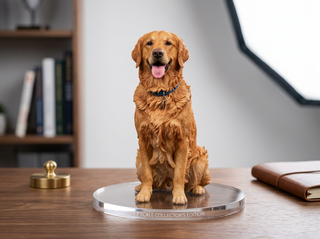
Procesa una foto de producto para crear una imagen con estilo de catálogo. Puedes definir el lienzo con ajustes preestablecidos de `image_size` o dimensiones personalizadas, elegir un `background` uniforme, transparente o de imagen, y ajustar `margin`. Hay disponible una `shadow` generativa o proyectada, además de una superposición opcional de `watermark`. La salida es png o jpeg, y jpeg no se puede usar con un fondo transparente.
Envía el nombre canónico o el nombre nativo, pero no ambos. Nombres canónicos
image_urlobligatorio
image
image_sizeopcional
backgroundopcional
background.modeopcional
background.coloropcional
background.color.robligatorio
background.color.gobligatorio
background.color.bobligatorio
background.image_urlopcional
background.image_fitopcional
marginopcional
margin.allopcional
margin.leftopcional
margin.rightopcional
margin.topopcional
margin.bottomopcional
shadowopcional
shadow.typeopcional
shadow.generativeopcional
shadow.generative.opacityopcional
shadow.generative.light_sourceopcional
shadow.dropopcional
shadow.drop.coloropcional
shadow.drop.horizontalopcional
shadow.drop.verticalopcional
shadow.drop.bluropcional
shadow.drop.opacityopcional
watermarkopcional
watermark.image_urlopcional
watermark.remove_backgroundopcional
watermark.positionopcional
watermark.scaleopcional
watermark.opacityopcional
watermark.marginopcional
output_formatopcional
Los parámetros de archivo aceptan una URL pública https://, un URI data: de hasta 10 MB o el file_url de una subida. Archivos
{
  "id": "req_8k2m4q7x1z9c3v5b6n0p2r4t",
  "object": "request",
  "model": "pixelcut/product-photo",
  "status": "succeeded",
  "created_at": "2026-10-20T12:00:00Z",
  "started_at": "2026-10-20T12:00:02Z",
  "completed_at": "2026-10-20T12:00:09Z",
  "queue_position": null,
  "cost": {
    "credits": 24,
    "usd": "0.024",
    "charged": 24,
    "refunded": 0
  },
  "input": {
    "image_url": "https://content.doitong.com/images/showcase/v3/gen_fox_cartoon.jpg"
  },
  "output": {
    "image": {
      "url": "https://content.doitong.com/dev-api/2026/10/20/req_8k2m4q7x1z9c3v5b6n0p2r4t/0-output.jpeg",
      "content_type": "image/jpeg",
      "file_name": "0-output.jpeg",
      "file_size": 1843200,
      "width": 1024,
      "height": 768
    }
  },
  "outputs": [
    {
      "type": "image",
      "url": "https://content.doitong.com/dev-api/2026/10/20/req_8k2m4q7x1z9c3v5b6n0p2r4t/0-output.jpeg",
      "content_type": "image/jpeg",
      "file_size": 1843200,
      "width": 1024,
      "height": 768,
      "stored": true
    }
  ],
  "error": null,
  "metrics": {
    "inference_seconds": 6.8
  },
  "urls": {
    "self": "https://api.doitong.com/v1/requests/req_8k2m4q7x1z9c3v5b6n0p2r4t",
    "cancel": "https://api.doitong.com/v1/requests/req_8k2m4q7x1z9c3v5b6n0p2r4t/cancel"
  }
}




Para agentes de IA: esta página en Markdown está en https://doitong.com/es-ES/developers/models/pixelcut/product-photo.md. Todos los modelos y guías: https://doitong.com/developers/llms.txt